Kalye Gangs & Turf Wars Guide: Territory Claims and HUD Signals
In Kalye, the gang and turf system allows players to start or join a virtual crew, spray their tag to claim neighborhood territory, and fight in turf wars against rival player groups and NPC gangs across Kampilan City. All territory disputes follow the core street rule where firearms are prohibited and every participant relies strictly on martial arts combat styles. Beyond the official Roblox description, recorded gameplay footage shows on-screen district banners, unclaimed territory tags, and overhead crew labels that signal when a neighborhood contest begins. This guide separates confirmed developer rules from observed HUD cues so you can navigate district conflicts effectively.
Confirmed Gang and Territory Mechanics
Developer Istetik Studios confirms on the official game listing that you can either form your own gang or join an existing group to compete for street dominance. The description connects spraying your tag with claiming turf, and names both rival players and NPC gangs as turf war opponents. The current official description does not lock in a fixed team size limit for these engagements, nor does it publish exact cash costs or menu paths for registering a new crew. When you want to establish or join a roster, inspect your on-screen menu tabs in-game to see the current requirements before spending your earned currency.
Reading the District HUD and War Event Banners
Visual observation from the World Weird Web gameplay video illustrates how the interface communicates territory ownership and active skirmishes. In the recorded build, avatars display gang membership labels directly above their heads, while a lower-right street minimap tracks your position within the city blocks. The district panel displays the active district name, such as TOIL COMPOUND, paired with a status sub-header right underneath it that reads NO GANG TERRITORY when a zone is unclaimed. When a battle triggers, a prominent alert banner appears across the screen announcing, 'The war over Toil Compound has started!'
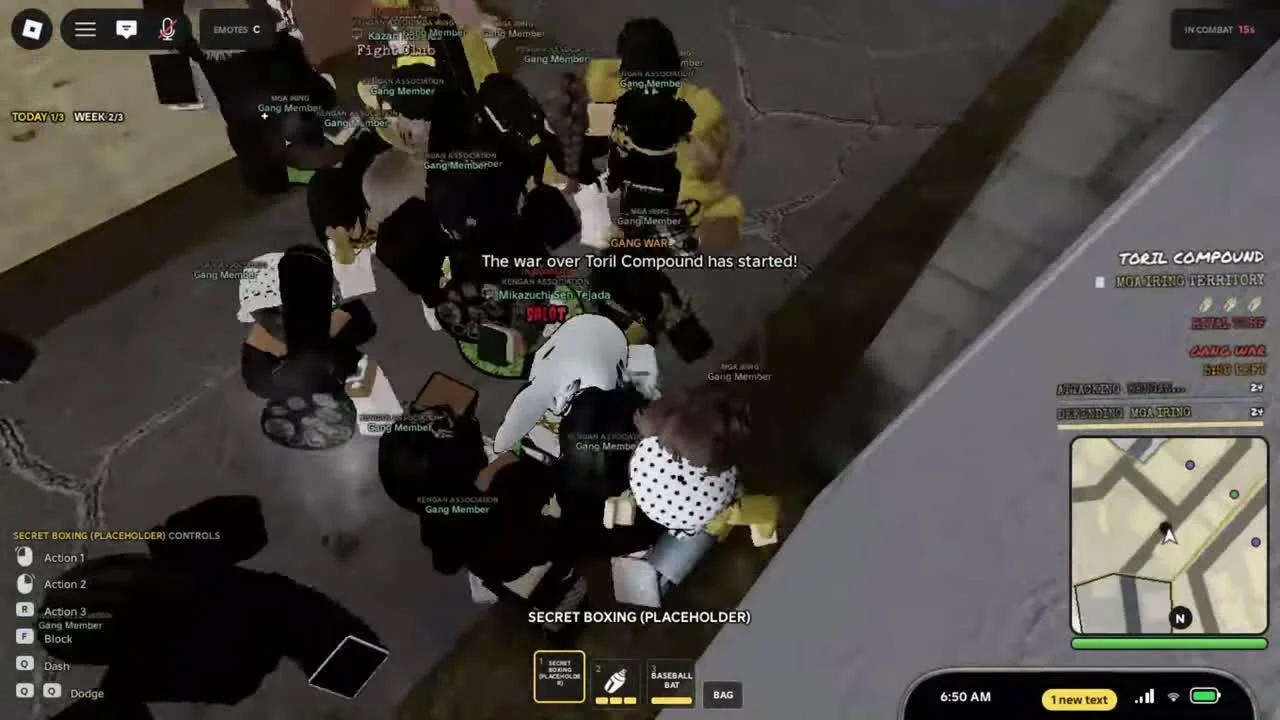
Neither the official description nor the video capture reveals the exact capture timer duration, scoring thresholds, or victory payouts for winning a district war. Because those rules are not publicly documented, you should watch the top territory header and central banner area closely whenever you enter a named compound. Checking whether a district reads as unclaimed or actively contested lets you avoid wandering unprepared into a multi-player brawl.
Tagging Territory vs Fighting an Active Turf War
The official listing mentions both spray tagging and turf wars, but does not explain the complete sequence connecting them. Spraying a tag is the confirmed method for marking a zone under your gang banner, though the exact interact prompt or required item slot for spraying is not visible in public footage. The observed war banner confirms that a named event has started in the recorded session. It does not establish that every avatar nearby is an event participant or that an NPC gang is involved in that particular event. If you find a tagging interaction in the current game, read its displayed requirements before confirming. The footage does not identify a valid wall, an item cost, a boundary rule, or a required rank, so those details need direct checking.
Checklist Before Joining an Ongoing Turf War
Entering a contested zone carries high risk because losing a fight in Kampilan City can place your character into a coma. Before you join a session with an active war banner, run through a quick interface inspection using the steps below. Following a structured routine ensures your fighting style and targeting controls are ready for group melee.
- Check the upper district header above your view to confirm the neighborhood name and current territory ownership status.
- Read overhead labels as affiliation clues; this footage does not validate a complete friendly or hostile color key.
- Read the labels beside status bars in the current build; their colors alone do not establish their exact meaning.
- Review the visible style label and action prompts; confirm available inputs against your Keybinds menu.
- Test your Z assisted combat lock-on and M2 block input once before stepping into the center of the compound.